Sunday, August 8, 2010

Nagasaki, iMovie, and others

Hi,

More stuff. You'll notice that I often link to www.freetech4teachers.com - I read a fair number of blogs, but that particular one gives a number of practical useful tools. I recommend following it.

First off, the Nagasaki Archive, which uses the Google Earth plugin to preserve the history and stories of the survivors of August 9th, 1945. Only a few of the stories are in English (even in the English preview), but I found that using Google Translate I could copy and paste the text and get a passable translation into English anyway.

http://www.freetech4teachers.com/2010/08/nagasaki-archive-preserving-history-of.html

Next is an iMovie quickstart guide for those with a Mac...or merely students with one!

http://www.freetech4teachers.com/2010/08/imovie-quickstart-guide-from-story.html

The next is a beta site called "Text the Mob". It's a polling service that would allow posing a question and allowing students to use their cell phones to text in their answer, essentially acting like the 'clicker' systems. There is a free version (with ads and limited in the questions). I don't exactly see students being allowed to pull out their cell phones in the near future, and I think a clicker system would end up being simpler and more useful (especially if embedded within the Smart board lecture itself). Cell phones are quickly becoming the mobile computer of choice, and I see this more of a harbinger of even more tools to come. You can get a TI-83 emulator for the iPhone (although the reviews aren't great), soon I expect you'll be able to add...everything.

http://www.freetech4teachers.com/2010/08/text-mob-poll-your-audience.html

Have students who do a double take, or feel like teaching is the blind leading the blind? The "Idiom Dictionary" may be just the ticket. In SciTech I will use contemporary examples of issues and reactions. More than once an ESL student has questioned the meaning of a common idiom - the Idiom Dictionary means they can at least check for the meaning while working on their homework during prep.

http://www.freetech4teachers.com/2010/08/idiom-dictionary-5000-idioms-explained.html

The next one is from "Bad Astronomy", an excellent science blog. This particular article summarized the 'State of the Climate' report, with some key diagrams to make it obvious why and how we know that the Earth is warming. It's directly applicable to Science 10, but in general I find it useful to have such resources on hand, whether it's global warming, 911 conspiracy, moon landing, vaccines, creationism,etc - it's often an opportunity to talk about the nature of logic, evidence, and critical evaluation of sources.

http://blogs.discovermagazine.com/badastronomy/2010/08/03/new-study-clinches-it-the-earth-is-warming-up/

This is just an 'oohhh, cool...' series of pictures taken using computational re-photography. Using a program to adjust a camera position to take a picture exactly where a historical picture was taken, some amazing amalgams of historical and modern scenes. I assumed it would be of interest to history teachers, but I thought they just looked amazingly cool. There is some indication that the future idea is that this program would be released as an iPhone app, allowing anyone to create such photos.

Computational re-photography - http://www.mymodernmet.com/profiles/blogs/the-ghosts-of-world-war-iis & http://sergey-larenkov.livejournal.com/

Lastly, science in progress. It's a dinosaur dig in progress (you can use google translate to have it appear in English).
http://www.forskning.no/svalbard/

Regards,


Monday, August 2, 2010

Pirates, Textbooks, and Drugs

Hi,

Bloom's Taxonomy according to Pirates of the Caribbean : http://www.youtube.com/watch?v=qjhKmhKjzsQ .

I've been told that, in order to progress in learning a new programming language, I have to memorize an exact sequence of commands even though I don't understand it. My brain hurts, so it started to wander around on its own and found some more stuff. Now I know what my students in Chem12 must feel like.

This series has a bit of a theme going. First is a New York Times article :
http://www.nytimes.com/2010/08/01/technology/01ping.html?_r=1&th&emc=th. The article is on textbooks, and comparing purchasing textbooks, or using readily available Internet resources and essentially make your own free textbooks. The 'Curriki' (free website) is here: http://www.curriki.org/xwiki/bin/view/Main/WebHome. The article makes the point that "2+2=4" for quite awhile, and writing and re-writing textbooks for the sake of purchasing new ones doesn't make much sense. In Chemistry (11 & 12) we have two textbooks - one's essentially a workbook, and another for background material in case the lecture doesn't quite cut it for explanations. I could easily see online materials taking up the roles of the latter - reaction kinetics is unlikely to change, and if it does I rather suspect online resources will change faster than the textbooks. The workbook on the other hand isn't possible to duplicate, but only as it's full of practice problems + answers that just isn't available anywhere else. Someday that might change, or perhaps I just haven't found it.

Continuing that theme is a blog from "Cool Cat Teacher" on comparing textbooks to buggy whips and railroads:  http://coolcatteacher.blogspot.com/2010/07/buggy-whips-railroads-and-paper.html .

Other sources for digital textbooks are http://about.ck12.org/ , an initiative to create "Flexbooks", which are freely available. When I last looked at Flexbooks the offerings were poor, but glancing at the chemistry text available it has improved substantially. Bookboon (http://bookboon.com/int) creates its own free textbooks, although they do put ads in them as well. WikiEducator has a link to these and a lot more ( http://wikieducator.org/Free_textbooks ).

Lastly, and completely unrelated, change.org has an article on the latest study from the U.S. Dept of Education : http://education.change.org/blog/view/why_peeing_in_a_cup_wont_win_the_drug_war. Apparently the last U.S. administration instituted funding for randomized drug testing in schools, and somebody decided to study it to see if it work. Science ruins everything.

Regards,


Saturday, July 31, 2010

Stuff and Things

Hi,

First, a picture that will change your life as you know it:

http://www.kotaku.com.au/2010/07/chewbacca-on-a-squirrel-fighting-nazis/

That's right - it's Chewbacca, on a squirrel, fighting Nazis. I think the world just ended.

Secondly, if RSS feeds, blogs, and wikis make you want to find an English-TechnoBabble dictionary, may I recommend Common Craft : http://commoncraft.com/rss_plain_english
& http://www.youtube.com/user/commoncraft?blend=1&ob=4#p/u/9/muVUA-sKcc4 . The first link is to an explanation of RSS feeds, the second an introduction to Google Docs. Common Craft uses paper cut-outs and 'plain English'. To use yourself, they're free, although the films are not technically 'free' - if you wished to use them professionally (i.e. in a presentation or a lecture) they're for sale. But as an individual you can watch the whole version online.

A similarly useful site is 'animated explanations' that (naturally enough) uses animations to quickly explain a concept. Here's one on twitter - http://www.animatedexplanations.com/Animation.aspx?animation=391 - and one diagramming how the heart functions - http://www.animatedexplanations.com/Animation.aspx?animation=342 .

I linked above to the YouTube Common Craft video explaining Google Docs. You can not only create regular Word/text/spreadsheet/presentation documents on Google docs, but also 'forms', for creating things like free online surveys. http://www.speedofcreativity.org/2010/07/30/create-a-free-online-survey-with-google-forms/

This is a wonderful video linking math to rock climbing. http://www.youtube.com/watch?v=vnoL8hiN65A

My Wonderful World is created by National Geographic to celebrate geography and encourage its study in students. It seems a bit geared towards the younger set, but I thought it may be useful to some : http://www.mywonderfulworld.org/index.html .

And lastly, you can now see weather on Google Earth. In real time! That's amazingly cool. (Lisa: Or you could just look out the window.) Whatever, I'm not leaving my bat-cave just to look at the weather. That's what computers are for : http://google-latlong.blogspot.com/2010/07/rain-or-snow-now-you-can-see-weather-in.html .

Regards,

Ron Neufeld

Canada's Best Boarding School

Saturday, July 24, 2010

Video Converter for Class Video Projects

Hi,

Classroom video projects are useful. Rather then the old 'poster' of "cut&paste", it can demonstrate the students explaining/demo'ing/acting a concept or idea themselves. Actually doing a video project, however, can be especially frustrating - students with multiple different video formats, operating systems, video editors, etc. I'm often confronted with a "this editor won't work with this video" because either they have a Mac file on a windows machine, or a windows file on a Mac machine, and currently they're not speaking to each other. If Mac would just buy Windows it would solve everything, but until then (and just today) I ran across a free video converter:

http://videoconverter.hamstersoft.com/

Unfortunately it only works on Windows (Vista, 7), and not on a Mac. Given that in any project there is always a mix that includes a Windows machine, that shouldn't be a problem.


Regards,


Wednesday, April 28, 2010

Password Security

Dear Colleagues,

A number of people have thanked me for my emails, and made a particular point about how they're saving all of them to a special folder to read 'later'. I know all about 'special folders' where you put things you don't have time to do right now, so I went back to my office and sobbed quietly to myself. The library was full of students, so it was a bit awkward.

Save if you like, but keep in mind that information streams from the inter-tubes much like water gently bubbles from a fire hose. Your email is likely searchable, I keep a slightly altered copy of these emails on a blog (http://teaching24-7.blogspot.com/), so keeping unread items in a folder to not read later isn't necessary - the information will be there (and if it isn't there Google will have 1.3 million hits of equivalent information).

With that in mind, I will endeavor to keep my emails down to only one or at most two items each. Quicker to skim to see if it's useful, and then pressing 'delete' if it isn't.

The first is a method to make keeping secure difficult-to-hack passwords easier to remember. I long ago lost count of the different number of sites I need a different password for. Remembering all this information is a challenge, and many people have come up strategies to meet this challenge. Using the same password on multiple sites, or 'class' of sites is one such method, using easy to remember passwords is another. I've seen passwords written on paper and stuck in drawers, and on the backs of monitors. Easy to remember passwords are also easier to guess (remember that unlike T.V. people don't guess passwords individually, they set up a computer to guess thousands of times per second using dictionaries and other common passwords). The difficulty with one password for all sites is the if one becomes compromised, they all do. It may not matter of someone hacks into your account for leaving comments on a blog, but if they can use that to get into your bank account, Facebook friends, or online email it's quite another. While someone posing as you could be embarrassing, it can also be used to ask your contacts to send you money - claiming to be stuck in a foreign country while traveling. With access to your email, it's trivial for a third party to determine when you might be out of country to make such a ploy possible. This doesn't even touch the severe and ongoing problems true identity theft can create. As a teacher, imagine if someone used your account to email all of your students inappropriate comments - I'd think I'd prefer my bank account being hacked instead.

It often seems, however, that I'm stuck in a catch-22. If I don't write a password down, I need it to be something I can remember, which means someone might be able to crack it. If I do make it complicated enough (i.e. minimum 8 characters of a mixture of letters, numbers, and/or symbols), then I need to write it down somewhere so that I can refer to it often - which opens up the possibility that someone would find my note.

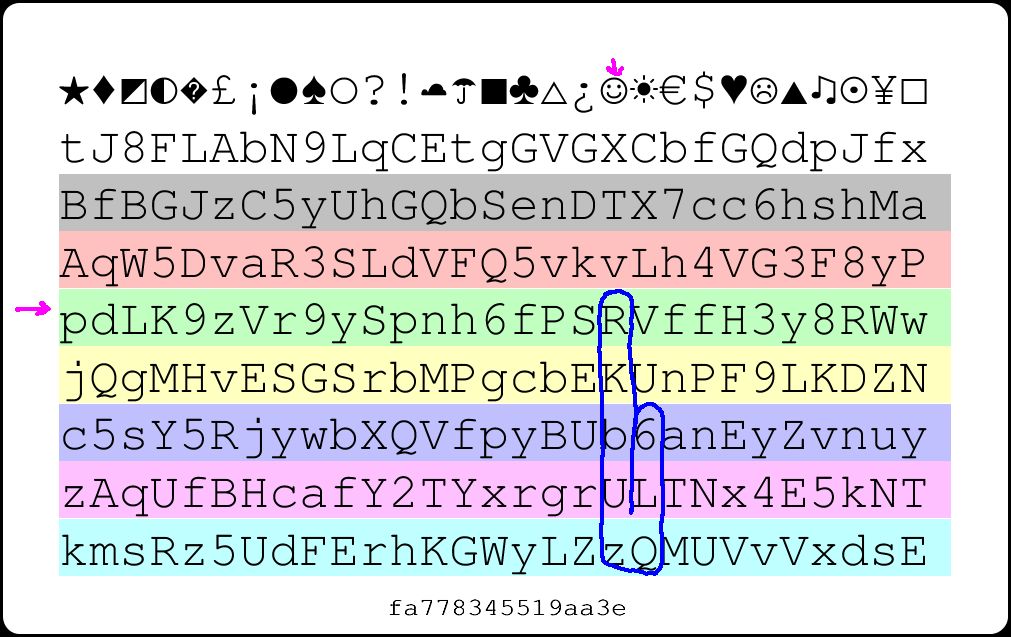
The neatest solution I've seen to this problem in awhile is http://passwordcard.org/ . The website will generate a unique set of random numbers and digits that look like so:


And I know you're saying "Thanks Ron, just what I needed - another set of incomprehensible letters and numbers".

The usefulness of the card is that the card itself allows one to meet the duel purpose of having passwords that are hard to crack by people 'out there', and have something that can be taped to your monitor, put in your wallet, etc, to refer to. As an example how it works, let's say you are going to use an 8-digit combination for your online bank password. Rather than memorizing a complex string, I remember "green happy face". Going down from the happy face symbol at the top, and the green line, my new password is "RVffH3y8" which is more than sufficient to meet security requirements, and difficult to hack.


Even better, I can print out this card, have it laminated, and put it in my wallet in case I forget the password. I can tape it to my computer, keep copies in my desk, etc. It doesn't matter if someone sees the card - there are literally thousands of combinations that are possible, running the combinations forwards, backwards,


up, down or any other easy-to-remember pattern:


I can use it and not even worry if someone is reading it over my shoulder, I lose my wallet, etc. I have the convenience of keeping my password written down when I need it, but without the added worry that it could be found and used by someone else. The website also gives the option to include a few rows of only numbers (for things like PINs) and can include symbols (just to take security up that extra notch).

As well, don't have the same security password for different purposes - the password I use for my blogs should be different from the password I use for my bank. The security of some websites varies in quality. I've even had one website directly email me my password when I successfully convinced them that I didn't remember it - if something is sent in a plain email then that password has been compromised, and was never secure to begin with. Websites with proper security and encryption would either reset your password and email you a random temporary one, or a link to reset your own password. If you can read it in your email, then you can assume anybody else between you and the servers could have read it too.

So I use the card to generate multiple passwords:


In this particular example I just remember "Green Happy face down" for RKbUzQL6, and "Red Umbrella Up" for FbtECqL9. Both are difficult to hack, but I can carry both with me at all times.

If this appeals to you, I'd recommend generating a unique version at http://passwordcard.org/ and then copying that picture and printing off several colour copies. Laminate one for your wallet, put another in your safe or file cabinet as a back up.

Passwords are your first, second, and last line of defense for your personal identity - if you spend a little time creating a secure system, you will have much less to worry about later on.

Regards,

Ron Neufeld

Canada's Best Boarding School

Thursday, April 15, 2010

Google, Social Studies, & Twitter

Dear Colleagues,

Given the short supply of that most precious of all resources (time), I will start with a summary of links to tools and discussion items for those that would like to explore without reading through the explanations and context that I've embedded them with.
  1. Searching within a domain such as education (.edu) or government (.gov) - using the "site:" search function.
  2. Using Google for definitions.
  3. Google Scholar
  4. Blog - Free Technology for Teachers
  5. Google Earth
  6. World War Battle sites for Google Earth
  7. CBC Archives
  8. Searching Canadian government sites with site:gc.ca
  9.  Demonstrating scale.
  10. Teaching About Web Includes Troublesome Parts
  11.  Oh my! Twitter makes history for Google search
  12.  Library of Congress archiving Twitter
  13. Google making Twitter searchable
  14. Twitter sign-up
I was recently reminded of the importance of proper searching in Google. As I move through the day with my CDS (Caffeine Delivery System), occasionally a student will make the mistake of trying to claim that aspartame is dangerous, on the basis of some Cquestionable website that informed them that aspartame is a 'chemical' and there exists a vast conspiracy to hide its toxic effects.
The problem is that when students (and of course I) search with something like Google, the most common way to use it is with simple search terms, i.e. "aspartame toxicity". The first page to pop up after such a simple search is one selling a book, and is a well-known contributor to conspiracy theories about aspartame toxicity. When distinguishing between fact and fiction, the most popular sites given by a simple search are often the least reliable.

Alan November mentioned using the "site:" command on Google to help eliminate unreliable search results. For example typing "site:.gov OR site:.edu aspartame" selects only websites that contain the word "aspartame" from either U.S. government sites (such as the U.S. National Institutes of Health) and educational sites from universities and schools (also in the U.S. - Canadian universities don't have a similar URL that can be used as a search criteria). The results give a completely different picture of aspartame. One the first page there is a link to the chemical formula and its history, several sites mentioning, and then debunking, the aspartame conspiracy/toxicity myth. Since using this method removes the .com's, the .net's and the .org's - all of which can be bought by anybody, for any reason. Lots of good sites are removed as well, but using this as a 'first search' for students helps pinpoint the reliable information first, before going to a more general search. Since students are inevitably getting a lot of their information through such searches, teaching such search techniques is essential to help students learn the difference between credible and non-credible information on the world wide web. This search example uses the "OR" command, which means it retrieves resources from either government or education sites - for a narrower search (such as only searching educational site) the "OR" command and the other search criteria can be omitted.

Google has a lot of useful methods to distinguish and refine the information you're looking for. In Biology 12 class some students forgot their textbooks and needed definitions while working on a worksheet. Rather than retrieving their textbook, they used the "define:" command in Google. Typing "define: androgens" returns a list of possible definitions from multiple sources - a quick read reveals to the student that this is a general term referring to male steroid sex hormones. I think I prefer this method over the "The Textbook" - it exposes them to multiple definitions, different nuances, and ensures they know it's the concept, and not the exact sequence of words, that's important.

In the same class a comment arose about sugar intake in children and its positive correlation to hyperactivity - a belief long held by teachers and tired parents everywhere. Rather than using the previously mentioned "site:" command, we checked directly using "Google Scholar". Typing "sugar behavior children" into Google Scholar immediately returns relevant results, with the most recent studies first. The first link is a meta-study debunking the sugar-hyperactivity myth. Of course not all students are trained to know the difference between good studies and bad studies, double-blind and proper controls, but at least with this search they're in the right ballpark for seeking truth, even if they end up in left field somewhere. Compared with a general Google search for "sugar behavior children", which does have both good and bad results on the first page, but the very first result is an author selling a book and a disease model of 'sugar sensitivity' to worried parents. Google Scholar is an excellent resource for any teacher, and a particularly important one to train our students to use in this information dense world.

Free Technology for Teachers is a great blog to follow for useful technology resources for the classroom regardless of your subject area, but one of the latest posts has a lot of resources for Social Studies teachers : 12 Resources All Social Studies Teachers Should Try .  One of the suggestions is using Google Earth to explore places and settings for historical settings - I'd seen examples of that before but I didn't know Google Earth has the capability to put an overlay of a battle, building, or historical map. I spent a bit of time following links and ended up exploring Dachau for too long.

I'll let you explore the blog yourself, but if you're just interested in Google Earth you can download and install Google Earth here : http://earth.google.com/intl/en/download-earth-advanced.html , and you can download world war battle sites here : http://www.gearthhacks.com/userfiles.php?user=1698 .

Another resource that makes me think of Social Studies is the CBC archives : http://archives.cbc.ca/ . They have a teacher section ( http://archives.cbc.ca/for_teachers/ ). Keeping with the world war theme, I listened to a radio broadcast from April 7, 1945, a Canadian reporter gives an account of the atrocities from a camp Canadian troops captured the day before.

Pausing before a brick wall splattered with blood and brains, the CBC's Matthew Halton tells Canadians back home about the atrocities committed by the Nazis. A day after Canadian troops capture a Nazi camp near Zutphen, Netherlands, Halton visits the site. He describes a trail of "slime and abominable crime," reporting that the worst thing you've ever read in any account of Nazi atrocities was there: "I saw and I was sick."

Serendipitously four other possible Social Studies sites were tweeted in the past week. The history site for Veterans Affairs Canada (http://www.vac-acc.gc.ca/remembers/sub.cfm?source=history), the history of federal ridings (http://www2.parl.gc.ca/Sites/LOP/HFER/HFER.asp) the Canadian Military History gateway (http://www.cmhg-phmc.gc.ca/html/index-eng.asp) and the Aboriginal Canada Portal (http://www.aboriginalcanada.gc.ca/acp/site.nsf/eng/ao04588.html). All are great resources, but similarly to the first topic I notice that the Canadian government seems to have settled on a site URL: ".gc.ca".
This brings up the possibility of directing students to include searches that specifically search the Canadian government's website for information using the "site:gc.ca" command on Google.

For example, what reliable information does our government provide on the Vietnam war? Google search site:.gc.ca vietnam war . I've found both the Canadian and American government site searches (.gc.ca & .gov respectively) give a lot of excellent scholarly and reliable information for students.

I couldn't leave without at least one technology tool devoted to science: http://learn.genetics.utah.edu/content/begin/cells/scale/. This is a wonderful flash demonstration showing relative sizes from a coffee bean to a carbon atom - scale is hard to grasp and this little tool does a great job of getting it across. Thanks to "A" in Bio12 for bringing it to my attention.

A NYT article titled "Teaching About Web Includes Troublesome Parts", and a blog article "Oh my! Twitter makes history for Google search" commenting on the fact that the Library of Congress is going to archive every public Twitter comment made, right back to its inception in 2006, and Google is also going to make all comments searchable. As an archive for history and posterity, there is a wealth of data.

I remember when it was announced that ice was found on Mars. How was this news first announced? TV, Newspaper, or blog? None of the above - it was tweeted from the Twitter account of the Mars Phoenix Lander directly (sadly, the little guy seems to have died). From breaking news to marriage proposals, our collective Tweets are being saved for posterity. (And if you're not on Twitter why not start now?).
Regards,

Ron Neufeld

Canada's Best Boarding School

Wednesday, April 7, 2010

JayCut, Margaret Atwood still alive, and some crazy

Dear Colleagues,

First a new tool for student video projects, Margaret Atwood, science / math video links, and some news stories.

The neat new tool is JayCut, a free online video editor that offers the ability to export the videos to YouTube or download directly in different formats. I have found video projects, particularly screencasting, to be a useful addition to the regular types of projects I assign. Not only are students picking up some valuable secondary technology skills, but I often find that students who have have to show that they understand a topic via video understand it better than those that just write about it. The difficulties with plagiarism and students copying the work of other students is also discouraged quite naturally - if you're forced to explain a concept with your own voice and in your own words it doesn't really matter if you got the information from your textbook or another student - you still have to learn it.

How does something like JayCut help? One of the significant difficulties I have with projects that are based on a technology is my own ignorance when facing the multiple different editors and laptops that students bring to class. Windows comes with its own video editing software, and so do Macs. I could force the students all to use Windows Movie Maker, software that's installed on the school computers, but that would punish those students with Macs as their ability to work on the project during prep would be limited. Something like JayCut gives everyone, from teacher to student, a common platform to work and edit their projects. Students could even share an account to collaborate during prep or otherwise separated by time and space. For trouble-shooting it also gives the teacher a common platform to become familiar with. Now if a student has problems using a unique video editing program, I tell them to put it into JayCut and I'll help them from there. There are some limitations, such as a maximum video length of 30minutes. Oh, and speaking of Macs, here's a completely unrelated vid on how to make an iPad float. Now, I need to convince my dept. head that an iPad is essential for my classroom and charge it to the science department....

In terms of building a PLN, I noticed that Margaret Atwood has become One Of Us; she's on Twitter. There's a recent article "How I learned to love Twitter" which helps explain how being part of Twitter is about being part of and developing a community. I remember reading Margaret Atwood when I was in school. At the time I thought she was one of those dead Canadian authors. Apparently I was wrong. The ability to observe (and possibly interact with) the authors of books under discussion seems an intriguing development, completely aside from Twitter's value as pro-d resource.

For those in Math or Science I would recommend checking out Khan Academy; a comprehensive set of YouTube videos on Math, Chemistry, Physics, Biology, arranged by topic. (The vision of the author is to provide high quality educational instruction anywhere in the world, for free.)

Lastly, some newsyish items that are related to education and to technology. (By technology, I mean I read about it online and it caught my outrage long enough to pay attention. That's a significant selection bias.)

A student in Mississippi (Constance McMillen of Itawamba Agricultural High School) wished to take her date to the prom, but there was a little snag. Her date was of the same gender, which was against school policy. This request was denied, and Constance was also told that if they arrived separately but danced together they'd be thrown out. Oh, and girls aren't allowed to wear tuxedo's either. You can check out the story here, and a Facebook fan page here. But wait! It doesn't end there. Apparently, feeling pressure afterwards, the school did decide to hold the prom. Except that it is looking like it was a decoy prom, that only Constance and a few other (presumably also less popular) students were invited to, while the 'real prom' was held somewhere else. It's not confirmed that the school officials were involved in the deception...but knowing what's involved in planning any event with students it would be difficult to defend the position that they did not. And the historical parallels alone...

Secondly item - I made the mistake of going to Fox News 'health' section (in my defense I found that the health section of USA Today was blocked by our proxy, and I wanted to check if it was all news sites, or just some), and I found this: Sex Education Could Mean Charges for Teachers. The logic is thus: teaching about contraception encourages sex, minors are not allowed to have sex, therefore teachers who teach about contraception are guilty of sexual assault. This is the opinion of a district attorney. Really really.

Regards,

Ron Neufeld
Canada's Best Boarding School